



Automated metadata tagging in Canto
Our product photos need labels so people can find them — the style name, the SKU, the metal, the stones. Typing those in by hand takes hours. This does it for you, one album at a time, and always shows you the plan before it changes anything.
What this actually is
Three things work together. Tap any word with a ? to see what it means.
The place all our photos live.
The bridge that lets Claude reach Canto.
The Claude skill — the instructions Claude follows.
A skill is a small app that runs inside Claude. Not something you install on your computer, and not a website you log into — it is a set of instructions saved into Claude itself. Once it is on your account, Claude reads it on its own the moment you ask about photo tagging, in any ordinary chat. Nothing to open, nothing to launch, nothing to keep updated.
What it’s called
You never have to type this. It is simply how the skill appears if you go looking in Claude’s settings, under Skills.
How to get it
Ask David to share it with you. This one is custom — we wrote it for Melinda Maria, so it is not in Claude by default and there is nowhere to download it from. David shares it to your Claude account. Once he has, it stays there and you never install it again.
Give Claude the command to trigger the skill
This does not happen inside Canto. You do it in Claude, and Claude changes Canto for you. You never touch a Canto screen. An ordinary new chat is all you need — there is nothing to set up and nothing to read first.
Open Claude, not Canto
- Open the Claude desktop app on your computer. Not the Canto website — the installed Claude app.
- Start a new chat. A plain, empty one. You do not need a project, a folder, or any notes: the Claude skill carries every instruction with it, which is the whole reason we built it as a Claude skill.
- Type your sentence in the message box at the bottom and press enter. That is the
same box you type everything else into.
NGS5Uis the album’s five-character code — the next section shows where to find it.Tag the Canto album NGS5U - First time ever? Stop and do the one-time connector setup in the next section first — it takes thirty seconds, and without it nothing below will work.
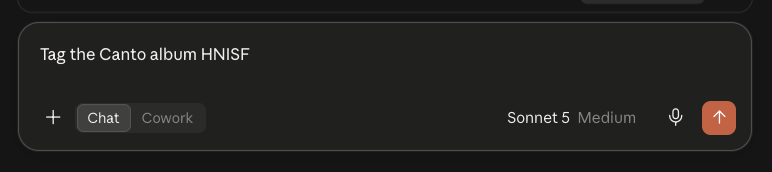 1 — type your sentence here
2 — leave it on Chat
3 — press enter
1 — type your sentence here
2 — leave it on Chat
3 — press enter
The real thing. A brand new, empty chat — no project open, nothing set up. The Chat / Cowork switch stays on Chat.
A whole album, or just a few photos
Two ways to say what you want. The rules, the plan and the approval are exactly the same either way — only the thing you point at changes.
What you can actually say
These are examples, not magic words. The skill is matched on what you mean, not on an exact phrase, so you do not have to memorise anything. Two things make it reliable: say the word Canto, and say what you are pointing at.
| What you want | Say something like |
|---|---|
| A whole album | Tag the Canto album HNISF |
| One photo | Tag the Canto photo ukdkjdrio57433rgkf840hgf3g |
| A few photos | Tag these Canto photos: ukdkjdrio57433rgkf840hgf3g, 8fqm2tzlk09441wbxr617pna4d |
| Same thing, other words | Fill in the metadata on Canto album NGS5U |
| Same thing again | Add the SKU and style details to these Canto images |
Listing more than one photo
Use the photo ID — the twenty-six character code section 3 shows you how to pull out of a photo’s web address. Separate them with a comma and a space. They do not have to be in the same album, and you can list up to twenty-five at a time.
The separator is forgiving
A comma and a space is the tidiest and the one to teach, but Claude is reading your sentence rather than running it through a strict parser. Commas without spaces work, and so does one ID per line (Shift + Enter makes a new line without sending). What matters is that each ID is complete and unbroken.
Or skip the ID entirely
You can paste the whole web addresses instead and let Claude pull the IDs out. It is slower to read back, but it removes any chance of clipping a character off a twenty-six-character code. Either way Claude tells you which IDs it picked up before it does anything.
Bundles and flat lays need no special words
A photo with several products in it is tagged with exactly the same command. The skill works out the shape from the file name and gives every product its own slot. You do not have to tell it.
“Album”, “asset”, “photo”, “image”
All fine, and so is anything else that plainly means the same — asset is Canto’s own word for a file, so it reads perfectly well. This guide says photo throughout only so there is one word to learn. If a phrasing ever doesn’t catch, name Canto and paste the code — that is always enough.
Worth being clear about, because it catches people out. If you pick a photo that is already labelled and the label is wrong, this will not change it — it will come back saying there was nothing to do. That is rule one doing its job: a person’s tag always wins over an automatic one.
So this is for photos with gaps. If what you actually need is a wrong value corrected, that’s a different job — tell David rather than re-running it.
Bundle shots — several products in one photo
Nothing extra for you to do — you still just name the album or the photo. But it’s worth knowing what happens, because the result looks different in Canto.
Every product gets four fields
The first one fills the usual Base SKU, MM SKU, Item Type and Style Name. The second fills ITEM 2 - BASE SKU, ITEM 2 - MM SKU, ITEM 2 - TYPE and ITEM 2 STYLE NAME, the third fills ITEM 3, and so on — in filename order, up to fifteen products.
Each one is looked up on its own
Product 2’s style name comes from product 2’s row in the Dev Log, not from the first one. Nothing is copied sideways. A product the sheet doesn’t know still gets its SKUs; its type and style name are left blank and reported.
Three fields hold everything
Item Type, Metal Color and Stone Color/Type carry every product at once — a gold and a silver piece correctly shows both. These are also the only fields Canto’s sidebar filters can search, so a bundle with a ring in it still turns up under a RING filter.
Collection Month, Collection Year, ITEM LENGTH and RING SIZE have no numbered version in Canto, so they take the first product. The others are left off on purpose — that’s not a gap, and it won’t be reported as one. Style Name used to be on this list and no longer is, as of 24 September 2026.
Canto’s filters check one field at a time, so filtering MM SKU only finds photos where that product is first. To search every item field at once: click the sliders icon next to the search bar, tick Exact Match and Custom Fields, then type the SKU into the search bar. Claude will remind you of this if you ask it where a product got to.
Which Claude should I use?
There are three ways into Claude. For this job the plain one is the right one, and it is worth understanding why.
A Claude skill is a written set of instructions saved into Claude itself — like a recipe
card it picks up automatically when the job matches. Ours is called tag-canto-album. You
don’t open it, install it or copy anything out of it. You just describe what you want and Claude
follows it.
Because the Claude skill travels with Claude rather than living in a project, any one of us can do this from a blank chat and get exactly the same behaviour, in the same order, with the same rules. That is what makes this shareable instead of something only one person can run.
Claude reads everything first and shows you a plan: how many photos, which labels, what they’ll say, and anything it is choosing not to touch. Nothing is changed until you reply “yes”.
If you get distracted and never answer, nothing happens. Closing the window is safe.
Reference: finding the codes
That sentence you just typed needs a code in it, and this is where you get one. There are two codes, they live in two different places in a Canto web address, and mixing them up is the easiest mistake to make here. This is the one section you’ll come back and look up again.
HNISF. It sits before the question mark, straight
after the word /album/.ukdkjdrio57433rgkf840hgf3g. It sits after the question mark,
straight after id=.The album code — a whole folder
Every has a five-character code, sitting in the web address — but not at the end of it, and not the only code-looking thing there.
This address has two jumbles of letters and numbers, and they look alike. The first one
(SVQCPIQ19E) is not the album — it’s our Canto account, and it is the same on
every address. The one you want is always the bit straight after the word /album/,
and it is always five characters.
Both addresses above point at the same album, and both give you the same five characters:
HNISF. Canto’s addresses change length depending on how you got there — whether
you searched, clicked through a folder, or changed the view — but the album code never changes.
The question mark is the finish line. Everything from the ? onwards is just Canto
remembering how you had the page set up: what size the thumbnails were, what you sorted by, which photo
you were looking at. None of it is part of the code. In example 2 that tail is longer than the rest of
the address put together, which is exactly why “copy the end” is the wrong instruction.
Step by step
Open Canto and click into the album you want. Look at the address bar at the top of your browser.
Find /album/ in it, and copy the five characters that come straight after. If there’s
a ? after those five, don’t include it or anything past it.
Don’t want to squint at it?
Paste the whole address into Claude and say “tag this Canto album”. It will pull the code out itself and tell you which one it used, so you can check it before saying yes.
Can’t find the album at all?
Just ask. Type “list the Canto albums with September in the name” and Claude gives you the names, the codes, and how many photos are in each. There are over a thousand albums, so give it something to narrow by.
The photo ID — one single photo
Click into one photo in Canto and the address changes shape completely. This is the code to grab when you want this photo and not its whole album.
For an album, everything after the ? was junk to ignore. For a photo it is the
opposite — the ID lives inside that part, and the bit before the ? is the
same on every photo in the company.
So don’t look for a position, look for a label. Find id= and take everything
up to the next &. Here that gives you ukdkjdrio57433rgkf840hgf3g. Note that
column=image has an equals sign in it too — it is id= exactly that you
want, nothing else.
Easiest way by far
Paste the whole address in and say what you want. Claude pulls the right code out itself and tells you which one it used, so you can check it before anything happens. This works for both kinds of address, and it is what we’d recommend over counting characters.
How do I know which I’ve got?
Length. Five characters is an album, twenty-six is one photo. If it has
/album/ in it you are looking at a folder; if it has smartalbum/image you
are looking at a single picture.
What has to be true first
Three things have to be true before this works. The first is a one-time setup on your own computer. The other two are about our data — and those are the ones the automation cannot fix for you. It works exactly as well as our data does.
Do this once, before your first run
You need the Canto MCP connector switched on for your own Claude account. The is what gives Claude its line into Canto. Without it, Claude will read the instructions and then have nothing to do them with.
- Open Claude’s settings and find Connectors. Look for Canto MCP in the list.
- Remove it, then add it back. Yes, even if it’s already there — especially if it’s already there. This is the important bit and it’s explained below.
- Sign in with your work email when it asks — your
@melindamaria.comor@7ate9.comaddress. Personal addresses are blocked on purpose. Claude never sees your password — you sign in to Canto yourself, the same as always. - Start a new chat. Settings changes don’t reach a chat that’s already open.
We keep improving the connector, and it has changed several times this month alone — new fields, new rules, fixes. An existing connection keeps showing Claude the old version. It doesn’t announce this or throw an error; it just quietly offers a stale set of tools, and you get an older behaviour without knowing why.
Removing and re-adding takes about thirty seconds and pulls in the current one. Do it before your first run, and again any time something behaves oddly or you hear that the connector has been updated.
These are not setup. They are about whether the information exists for Claude to copy, and no amount of re-running will fix them.
_P_ before the version number — and
those three could not be touched until Payam renamed them. Perfect Dev Log data would not have
saved them.__ and ___ both work and mean the same
thing. Drop back to a single one and nothing breaks visibly: only the first product is read and the rest
are silently ignored, leaving a bundle tagged as if it were a solo shot. The Photo Naming
Convention page linked at the bottom shows the exact pattern.Worth knowing, because it tells you who to go to when something comes back blank.
From the file name
Base SKU, Metal Color, Photo Position, Asset Category. These need nothing but a correctly named file. If they’re blank, the name is wrong — Payam.
From the Dev Log
Style Name, Item Type, Stone Color/Type, Collection Month, Collection Year, MM SKU, Collection Name. If they’re blank, the sheet row is empty — Adriana.
We checked the whole sheet: 29 tabs, 769 products, not one Collection Name filled in. The column exists but the team hasn’t started using it. So this field comes back empty on every photo in every album, and Claude deliberately says nothing about it — otherwise every run would end with a complaint nobody can act on.
It will start filling itself in the moment Adriana begins using that column. Nothing else needs to change.
What a good run looks like
You said yes. Here is what comes back, in order, so none of it is a surprise.
It writes in small batches
Fifteen to twenty photos at a time, not all at once. If something fails, it fails small and it’s obvious which photo caused it.
It reads every value back out
This is the part that matters. Canto will happily say “success” for a change that never happened, so Claude goes back, reads each photo again, and compares it against the plan.
It tells you the count it verified
Something like “101 values written across 31 photos, all 101 confirmed present”. If that confirmed number is lower than the written number, something went wrong — say so.
It hands you the leftovers
Everything it wouldn’t decide on its own, with a name beside each one. That’s the next section, and it’s the genuinely useful part.
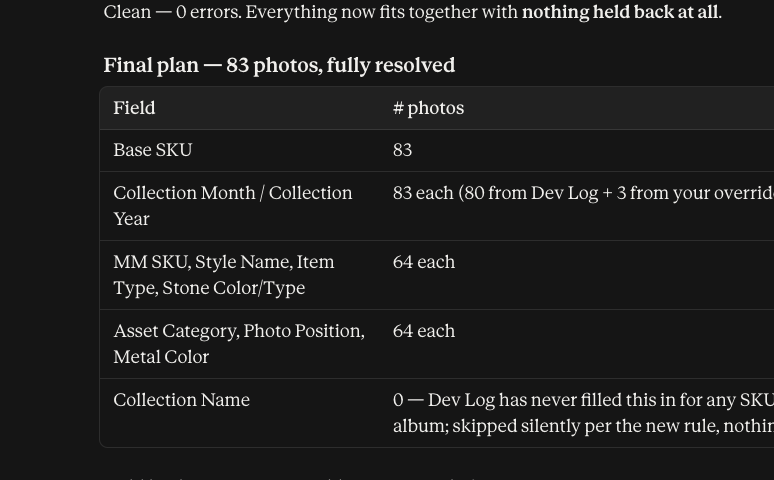 the plan, before anything is written
nothing happens until you answer
the plan, before anything is written
nothing happens until you answer
Stage 1 — it asks. Every field it intends to fill, with a count, and a plain question at the end. If you close the window here, nothing has changed in Canto.
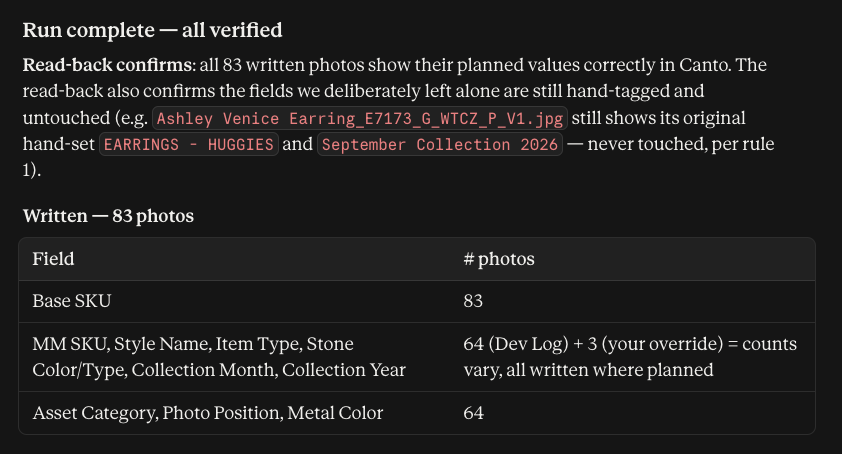 read back from Canto, not assumed
“held back: none” — nothing skipped
read back from Canto, not assumed
“held back: none” — nothing skipped
Stage 2 — it proves it. This is the screen that matters. Claude went back and re-read every photo in Canto to confirm the values actually landed. It also confirms the hand-tagged fields it left alone are still exactly as they were.
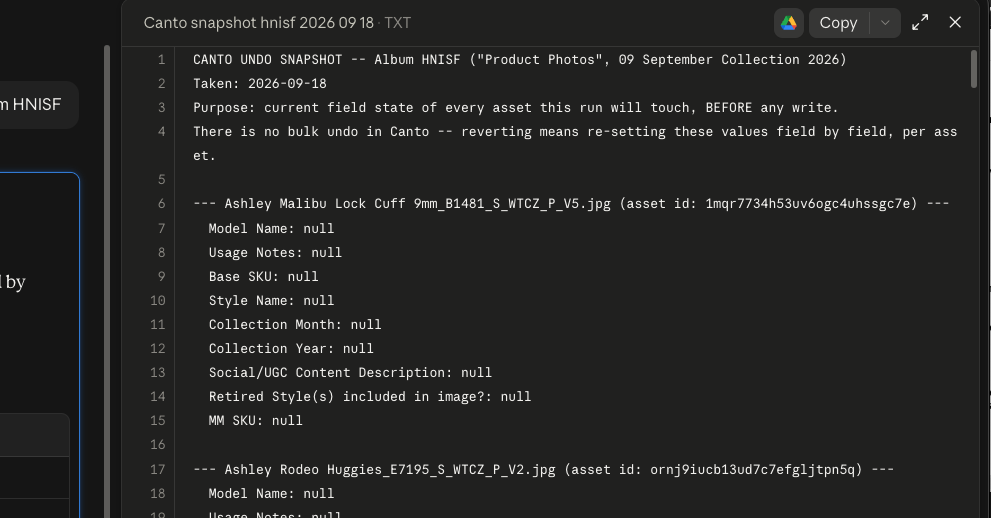 your undo file — keep it
And you get this. A plain text file listing every photo and what each field held before the run. Canto has no undo button, so this file is the only way back. Save it somewhere you’ll find it.
The instinct is to read a long report as “it didn’t work”. It usually means the opposite: the run found real problems in our data that were already there and nobody had spotted. The only line that tells you whether the run itself worked is the verified count.
Two results are also fine and mean nothing is wrong. “Nothing needed doing” means the album was already fully labelled. “Held back” means a rule stopped Claude on purpose, and it will always say which rule.
How long it takes
A normal album — thirty to fifty photos — runs in a few minutes, most of it waiting for the plan.
Your undo file
Before anything is written you get a snapshot file of how every photo looked beforehand. Keep it. There is no undo button in Canto.
Check it yourself
Open the album in Canto and look at two or three photos. You should see the labels filled in and nothing you recognise overwritten.
What it hands back to you
Every run ends with a list of things Claude wouldn’t decide on its own — a , not a failure. This is the useful bit: it’s where real problems in our data show up.
| What you’ll see | What it means in plain words | Who sorts it out |
|---|---|---|
| Conflict | The file name and Canto disagree. Canto keeps what it has; you decide if the file name is wrong. | Rachid |
| Not in the Dev Log | That column is empty in the sheet, so the label is left blank rather than made up. | Adriana |
| SKU not found | The product isn’t in the sheet at all. Usually a wrong code in the file name. | Adriana or Payam |
| Can’t read the file name | No SKU or shot type in it. Listed in full so someone can rename it. | Payam |
| Held back | Something Claude could have filled in but shouldn’t, under one of the rules above. | You — with the reason |
The labels it fills in
Twelve of them. The ones in pink lean on the — the file name alone can’t fill them in. Tap any label to see what goes in it.
N6387. SKU just means the code a product is sold under.N6387GWTPRL. The Base SKU always has to be the start of it; if it isn’t,
Claude stops and tells you rather than writing either one.NECKLACE -
TENNIS — that is kept and the plain word is not added over it.CZ. So
PRL means pearls only, and PRLCZ means pearls and Diamondettes — two
different products, two different labels.18 for an 18-inch necklace. It comes from the Dev Log where the sheet has it, and
off the end of the file name where it doesn’t. Rings never get this label — a ring has a
size, not a length.7. It sits in the file name in the same place a necklace length would, right after the stone
code, and Claude works out which of the two it is from the first letter of the product code:
R means ring, so the number is a size.A single box in the Dev Log can name two stones with nothing between them. WHITE CZ BLACK CZ
means the piece has both — so Claude adds both labels, not one.
It always takes the stone from the sheet, never from the file name. File names get this wrong: our whole
July 2026 pearl range says PRL in the file name when the products are really
PRLCZ.
Rules it can’t break
These aren’t suggestions. Each one is here because something went wrong once. The skill carries fourteen numbered rules; these are the ones that change what you see. The rest are internal plumbing you never have to think about.
NECKLACE - CHAIN and NECKLACE -
TENNIS keeps both. A file name can only ever suggest plain NECKLACE.October Collection 2025, that stays — even when
the Dev Log thinks it belongs to 2026.R6115 when
the product is E6083. Caught and reported, not written.ITEM 2
through ITEM 15 — base SKU, MM SKU, item type and style name for every product, in the
order they appear in the file name, each looked up in the Dev Log on its own SKU.A real run
Album HNISF — the September 2026 product photos, 18 September 2026.
These are the real numbers, including the awkward ones.
Nothing failed
The 84th photo wasn’t a failure — someone had already filled in every field by hand, so there were no blanks left to fill. Rule one did its job.
3 renamed, then fine
Missing the _P_ in the file name. Payam
renamed them, we re-ran, they tagged cleanly.
Collection Name: zero
Not a fault. The Dev Log column is empty for every product we sell, so there was nothing to copy.
If something goes wrong
“I can’t reach Canto”
The connector has dropped, or was never added. Remove Canto MCP in Claude’s settings, add it back, sign in with your work email, then start a new chat — the same fix as the one-time setup in section 3.
It behaved differently last time
Almost always a stale connector. Remove it and add it back, then try again. An old connection keeps handing Claude the old set of tools without ever saying so.
Nothing needed doing
The album is already fully labelled. That’s a good result — Claude will tell you rather than changing anything.
You said yes by mistake
Say so straight away. A copy of how every photo looked beforehand is saved before anything is written, so it can be put back. It’s done one label at a time, so tell someone quickly.
A label looks wrong to you
Say so instead of approving it. You and Rachid know the jewellery; the sheet only writes it down. Claude won’t argue with you about a product.
Tell David what you need
Every rule in this guide exists because somebody used it and hit something annoying. Three of them were written in a single afternoon, off the back of one real album. That is the fastest way this gets better — you using it, and saying what got in your way. A field that keeps coming back blank, a question it asked that you couldn’t answer, something you wish it did, a bit of this page you had to read twice — all of it is worth sending.
Canto tagging · skill v15
Where each product in a bundle lands
A bundle shot holds several pieces of jewelry. As of 24 September 2026 each one gets four Canto fields of its own — its base SKU, its MM SKU, its item type and its style name — all looked up in the Merch Dev Log by that product's own SKU.
The main path
One filename in, three products out, twelve fields written. Nothing is copied sideways: product 2's style name comes from product 2's row in the sheet.
Why Item Type sits in both places. The numbered ITEM n boxes are plain text — Canto's sidebar filters cannot search them. So the main Item Type field still receives every product's type, merged. That is what keeps a bundle containing a ring showing up under a RING filter.
The two lanes that did not change
Some fields have no numbered equivalent in Canto, and some describe the photograph rather than anything in it.
Product 1 only
No numbered version exists. Products 2 and 3 are dropped here on purpose, and not reported as gaps.
A ring has a size, never a length — an R SKU never writes ITEM LENGTH, not even from the sheet.
The photo itself
Read once off the ending _E_4023, never off the split-up product pieces. One of each, however many products are in the shot.
On an e-comm shot 4023 is a camera frame number, not a position, so Photo Position stays empty — that is correct, not a fault.
What actually changed on 24 September
Style Name took the first product only, and the other products' style names and item types were thrown away.
Style Name has left the product-1-only lane.
Two spellings, on purpose. The type fields carry a hyphen — ITEM 2 - TYPE. The style-name fields do not — ITEM 2 STYLE NAME. That is how they are configured in Canto. Copying them any other way makes the write fail.
Fifteen products is the ceiling. Canto has complete four-field sets for items 2 through 15, and nothing above them. A sixteenth product is dropped and named in the run report. Around seven SKUs is as many as will physically fit in a filename today — that is a limit of the filename, not of the ceiling, so if a way is later found to reference more in one shot it runs through this same structure unchanged.
A half-built set is worse than none. A lone ITEM 16 STYLE NAME once existed with no BASE SKU, MM SKU or TYPE beside it, and was deleted on 25 September. Adding a sixteenth product later means adding all four at once — otherwise the automation can see a box it must not fill.
Verified against Canto's 78 configured custom fields, 25 September 2026.
How does this work
The technical companion to the tagging guide. This is what we built, what talks to what, and where every value comes from. You do not need any of this to tag an album — it is here so that the next person can maintain it.
The flow of information
Two sources of truth feed one plan. Nothing reaches Canto without passing a human.
The pink box is the only path from a plan to a change. There is no automatic mode, no scheduled write, no “approve all”. If nobody says yes, nothing in Canto moves.
What happens in a run
Five stages. Four are automatic; the pink one is the gate, and it is the only place a person is required.
Read every file name
The naming convention encodes style name, SKU, metal, stone code, size and shot type. The parser decodes all of it, then compares what it found against what Canto already holds, so only genuine gaps go into the plan. Disagreements between the name and Canto are recorded as conflicts, not resolved.
AutomaticLook up the Dev Log
Collection Month, Collection Year and Stone Color/Type are not in the file name. One request pulls every SKU at once — a whole album, a handful of named photos, or every product inside a bundle shot. Fields the sheet has left empty are reported rather than invented, and a SKU matched only on its opening characters is checked to confirm the matching rows agree before any of it is used.
AutomaticBuild the plan and rehearse it
Filename values and Dev Log values are merged, then filtered by every rule: fill blanks only, skip conflicts, never contradict an existing MM SKU, never let the sheet overrule a date Canto already holds. A dry run then validates every remaining value against Canto’s configured lists. A snapshot of the current state is written and handed to the operator as a download — the undo record has to reach the person running it, not a folder only some people have.
AutomaticA person reads it and says yes
The plan is presented in full: counts by field, the actual values, every conflict, every SKU not found, and everything deliberately held back with its reason. Nothing has been written at this point. Without an explicit yes, the run ends here.
Requires a personWrite, then prove it
Values are written in batches of 15 to 20 so a failure is easy to isolate. Then every value is read back out of Canto and compared against the plan, and the held-back assets are checked to confirm they were not touched. Canto returns success for writes that changed nothing, so the read-back is the only actual evidence.
AutomaticWhat a run can be pointed at
A run starts from one of two things, and the difference is only in how the photos are collected. Once there is a list of photos, everything downstream is identical — same rules, same plan, same approval, same read-back.
A whole album
One call parses every filename in the album and reports, per photo, which of the proposed values are still blank in Canto. The blank-detection comes free because the parser can see the assets.
Named photos
Each photo is fetched by ID first, which returns its filename and its current field values. The filenames are then parsed detached from their assets, so the blank-detection has to be done by comparison instead — that comparison is the only thing keeping the fill-blanks-only rule true on this path.
Shape one — bundle shots, split before anything else happens
A filename holding several products joins them with a run of two or more underscores. Handed such a filename whole, the parser reads the first product and reports the rest as unrecognised fragments — a result that looks right and quietly omits most of the photo.
Split on the separator
The filename breaks into a bundle name, one block per product, and the shared ending — the shot type and the version or frame number. Two underscores or three both count as a separator; a single one does not.
Rebuild each product as an ordinary filename
Every block is recombined with the bundle
name and a fixed ending, _P_V1, producing filenames the existing parser already
understands. The real ending is read separately, once, off the whole filename. No new parsing code was
needed for any of this.
Look every product up at once
All the SKUs across all the photos go into a single Dev Log call, bundle components included.
Map products to fields, in filename order
The first product fills the ordinary
Base SKU, MM SKU, Item Type and Style Name; the
second onwards fill the numbered ITEM n sets — four fields each, every value taken
from that product’s own Dev Log row. Order in the filename is order in Canto.
Shape two — collection flat lays, which carry their SKUs differently
A flat lay of a whole drop lists full MM
SKUs separated by single underscores —
September Collection 2026_Black CZ_R6074GBLKCZ7_R6115GBLKCZ7_R6132GBLKCZ7_FL_6.
There is no doubled underscore, so it is not a bundle, and the parser hands those segments back as story
fragments rather than SKUs. They used to be discarded.
Which fragments are products?
The name mixes real SKUs with a theme label. Black CZ sits in the same position as
R6074GBLKCZ7 and looks no different to a splitter.
Ask the Dev Log, don’t pattern-match
Every fragment goes into the same lookup. Real SKUs come back with a row; the theme label comes back not found and is dropped. The sheet decides, so no SKU is lost to a pattern that didn’t anticipate it.
From there a flat lay is tagged exactly like a bundle — four fields per product, numbered in filename order, fifteen maximum, descriptive fields merged. It needs no rebuilding at all, because the filename already carries complete SKUs.
Canto’s fields are of two kinds, and that alone decides the behaviour. Multi-choice fields — Item Type, Metal Color, Stone Color/Type — hold a list, so they take everything in the photo. Text fields hold one value, so Collection Month, Collection Year, ITEM LENGTH and RING SIZE take the first product and the rest are deliberately dropped.
Four things escape that limit, because there are fifteen numbered sets to put them in: base SKU, MM SKU, item type and style name. Style name joined that list on 24 September 2026 — before then only the first product’s style name survived. Past fifteen products the extras are dropped and named in the report.
One consequence worth knowing: the numbered ITEM n fields are plain text, which Canto
does not validate and its sidebar filters cannot search. That is why the multi-choice Item
Type still receives every product’s type merged — it is the only place a filter can
see a bundle’s contents.
The connector
A small server we wrote and host. It is the only thing that talks to Canto, and it is the only thing that talks to the Dev Log.
Canto MCP
Runs on Cloudflare Workers. Deployed from the repo with one command; there is no server to patch and nothing running on anyone’s laptop.
npx wrangler deploy from canto-mcp/worker-oauth-rebuildReads the file name
Decodes style name, SKU, metal, stone code, size, shot type and version. Works out the Item Type from the SKU letter plus keywords in the style name.
Reads the sheet
Signs in as the robot account, pulls every in-scope tab in one request, and caches it for ten minutes so a run does not hammer the sheet.
Serves the tools
Handles sign-in, exposes the 29 tools to Claude, and validates every value against Canto’s configured lists before anything is written.
How it reads the Dev Log
This was the hardest part to build and the most important to get right. Adriana’s sheet had to become readable by software without becoming editable by it.
A robot account, read-only by design
A Google service account — a login that belongs to the company rather than to a person. It has no password, no inbox and no browser. Adriana shared the sheet with its address the way she would with a colleague.
| and shift every column after them.An earlier attempt read the sheet through an export and reported it as 77% broken. Nothing was wrong
with it — the export had split every cell containing a |, and Gold | White
Diamondettes is a perfectly normal value.
A second attempt matched tab names on the year and silently lost two tabs with no year in their names, along with 18 products nobody noticed were missing.
The translation layer
The sheet was written for people. Canto only accepts values from a fixed list. Something has to sit in between, and that something must never guess.
| The Dev Log says | Canto gets | Why it needs translating |
|---|---|---|
| BRACELET-CHAIN | BRACELET - CHAIN | Spacing around the hyphen differs |
| RINGS | RING | The sheet pluralises, Canto does not |
| SEPTEMBER | September | The sheet shouts |
| WHITE | White Diamondettes | Shorthand for White CZ |
| SHELL PEARL WHITE | Pearl | A real pearl, not a simulated stone |
| WHITE CZ BLACK CZ | Black Diamondettes + White Diamondettes | One cell, two stones, no separator |
| WHITE CZ & AQUAMARINE A027 | White Diamondettes + Aqua Diamondettes | Two stones plus a part-number fragment that is noise |
Longest match first
The matcher repeatedly finds the longest stone name anywhere in the cell, records it, blanks
it out, and goes again. Match WHITE before WHITE MOTHER OF PEARL and you get
the wrong answer twice over.
Anything unknown is reported
Leftover text comes back flagged for a person to rule on. New stones get added to the table by hand. The matcher is never allowed to infer one.
When the sheet has nothing, the filename gets a turn
The translation above only runs on a Dev Log cell. If the sheet has no row for a SKU, or has the row but left the stone blank, there is nothing to translate — and until 24 September the field simply stayed empty.
The Dev Log
Still the better source and still first in line. One cell can hold two stones with no separator, and the matcher reads both. Nothing about this changed.
The filename code
Sixteen codes translate straight to Canto values — WTCZ to White Diamondettes,
PRLCZ to two values at once. Used only where the sheet was silent, and every photo tagged
this way is named in the report.
Filenames get the stone wrong at scale: the entire July 2026 pearl range is written PRL
when the products are PRLCZ. Those SKUs are in the Dev Log, so the sheet answers first and
the filename never gets asked. The fallback only ever fires where the alternative was writing nothing at
all — which is the one situation where a second-best answer beats an empty field, because an empty
field gets filled correctly on a later run while a wrong one never does.
The same order now applies to MM SKU, ITEM LENGTH and RING SIZE. A ring is the
exception worth knowing: it has a size, never a length, so a ring number goes to RING SIZE
and nothing ever writes ITEM LENGTH on one.
What this build changed
The connector existed before. These are the things added or fixed to make album tagging possible at all.
Dev Log lookup
Two new tools. The connector can now read Collection Month, Collection Year, Style Name and Stone Color/Type straight out of the sheet — things no filename can carry.
Stone mapping
All 16 real values in the sheet now map to Canto values. Stone Color/Type had never been written by the automation before; this unblocked it.
Pearl split in two
PRL is a real pearl; PRLCZ is pearls plus stones. Canto’s old
Pearl Diamondettes bundled them into one name, so a pearls-only piece claimed stones it
did not have. 83 photos corrected.
Four rulings replaced four escalations
Collection Name is skipped silently instead of reported; size and length variants write the base SKU instead of stopping; a SKU on two tabs takes the later one; bundles split. Each one removed a question the automation used to ask a person for no benefit — the variant rule alone was stopping 44 photos in a single album.
Room for fifteen products
Fifty-six Canto fields, ITEM 2 through ITEM 15, each a set of four: Base
SKU, MM SKU, type and style name. The type and style-name halves arrived on 24 September 2026. There is
deliberately no ITEM 1 — the original fields are item one, so a bundle and a solo
shot have the same shape and nothing needed migrating.
Around seven SKUs is as many as will physically fit in a filename today, but the ceiling is deliberately fifteen. If a way is later devised to reference more products in one shot, it runs through this same parsing structure and these same fields, with nothing to rebuild.
A Dev Log gap no longer means an empty field
Where the sheet is silent, the filename now supplies Stone Color/Type, MM SKU, ITEM LENGTH and RING SIZE. The sheet still answers first every time; the filename is strictly the fallback, and every value taken that way is listed in the report so it can be checked.
Tab scope
Two tabs with no year in their names were being silently dropped, taking 18 products with them. Now declared by hand rather than pattern-matched.
Why file names matter so much
Everything upstream of the connector depends on photos being named correctly. That is why the naming convention is a document in its own right.
File names are typed by people under time pressure, and they carry real errors. The whole July 2026
pearl range is written PRL when the products are PRLCZ. One Smooth & Diamond
Hoops photo carries R6115, which is a different product — a ring.
So the filename supplies what only it knows, the Dev Log supplies the rest, and where they disagree the disagreement is reported rather than resolved quietly.
If you have to maintain this
| You want to | Where it lives | |
|---|---|---|
| Add a new stone | Canto admin first, then devlog.js → STONE_TERMS for the sheet wording, then the filename-code table in the skill and on the naming convention page — three places, all of them | |
| Add a new item type | Canto admin first, then devlog.js → mapItemType | |
| Make room for more than 15 bundled products | Add the full ITEM 16 set in
Canto’s admin console — all four: Base SKU, MM SKU, - TYPE and
STYLE NAME — then extend the mapping rule in the skill. Mind the spelling: the type
fields take a hyphen, the style-name fields do not. Refresh the connector’s field list afterwards
or it will reject the new names. Never add just one of the four — a lone
ITEM 16 STYLE NAME existed for a while and had to be deleted, because a half-built set is a
box the automation can see but must not fill. | Canto admin, then the skill |
| Change how filenames are read | filename-parser.js | |
| Change the rules of a run | the tag-canto-album skill | |
| Bring a new Dev Log tab into scope | devlog.js → DECLARED_TABS / EXCLUDED_TABS — then count the rows before and after | |
| Deploy a change | npx wrangler deploy, then check /health |
Canto reports success for writes that did nothing. A success message is not evidence. Read the values back.
An empty field beats a wrong one. The automation fills blanks and never overwrites, so a wrong value is invisible to it forever, while an empty one gets filled correctly on the next run. When in doubt, leave it empty.
Part 2 of this page shows which product in a bundle lands in which Canto field, one lane at a time.